

Kysoo: No-Code Voice Agent Builder
Summary
Kysoo is Jammi's product; he architected it and leads the build. I contributed roughly 20 percent, concentrated on the parts a user actually touches: the node editor canvas, the Tool node's HTTP configuration, the workflow preview modal with its embed script, and the deploy and release flow. Kysoo turns 'I want a voice agent that can talk to customers, hand off between departments, and call my APIs' into a drag-and-drop build with zero code, testable live and embeddable anywhere.
Project Snapshot
My Role
Contributor (~20%) · Product built and led by Jammi
Duration
2026 · ongoing
Context
Kysoo, my collaborator Jammi's voice agent product
Outcome
Live builder · multi-agent handoff and API tool calls with zero code · embeds anywhere with one script tag
Stack
The Problem
Context
Voice agents are in demand for order lines, support desks, and department routing, but building one means wiring real-time audio, speech-to-text, an LLM, text-to-speech, and tool calling together in code.
The Pain
The people who best understand the conversation, a restaurant owner or a support manager, can't build any of that. Agencies quote heavy custom builds for something that is conceptually a flowchart: greet the caller, answer, place the order, or hand off to another department.
Why It Mattered
Every business that gives up at the quote stage is a voice agent that never ships. The gap between 'I can describe my call flow' and 'I can deploy my call flow' is the product opportunity.
Goals & Requirements
Technical Goals
- A visual canvas where flows are drawn: Start, Voice Agent, Tool, and End nodes wired together by dragging
- Voice Agent nodes carrying their own chat model configuration (provider, model, API key), tools list, and voice and STT settings
- Tool nodes with full HTTP configuration so an agent can call any REST API mid-conversation
- Multi-agent handoff as a native pattern: transfer tools that route the caller between agent nodes inside one flow
- A live preview with validation, so a builder talks to their agent before anyone else does
- Versioned deploys that generate embed code, so one script tag puts the agent on any website
Constraints
- The audience is non-technical, so broken flows must be caught at preview time, not discovered by customers
- Voice UX is latency-sensitive, which is why details like a pre-connect audio buffer exist
- The embed has to be a single script tag that behaves on any host site it is dropped into
Architecture Design
The canvas editor compiles a node graph of agents, tools, and transfers into a deployable voice workflow. Each Voice Agent node carries its own model configuration, tools, and voice and STT settings, edited in a side panel with collapsible sections. Tool nodes define real HTTP calls with method, templated URL parameters, headers, and body modes. A Workflow Preview modal runs the live agent with a validity check before deploy. Deploying creates a versioned release and generates embed code; on the host site, a popup launcher appears in the corner and any visitor can talk to the agent.
Scroll horizontally on smaller screens to view full diagram
Component Breakdown
Node editor / canvas (my area)
Drag Start, Voice Agent, Tool, and End nodes from the toolbar, wire them into a flow, and edit the selected node in a side panel
Voice Agent node
The conversational agent: chat model config (for example OpenAI GPT-4o Mini with an API key field), a Voice Agent Tools list, and Voice and STT configuration sections
Tool node HTTP config (my area)
Defines a callable action with method, URL including templated path parameters, custom headers, and body as none, JSON, or form data with a raw JSON mode
Workflow Preview (my area)
A live test modal with a Valid status badge, an animated voice orb reflecting idle and speaking states, mic and text input, and toggleable agent settings (chat input, video input, screen share, pre-connect buffer, voice selector)
Deploy & release flow (my area)
A deploy modal with Deploy, Embed & Preview, and History tabs. Each deploy is a release, and embed codes are generated per release
Embed popup
One script tag with a sandbox id and workflow id mounts a launcher button in the corner of any host page
Key Design Decisions
→Multi-agent handoff as a first-class pattern
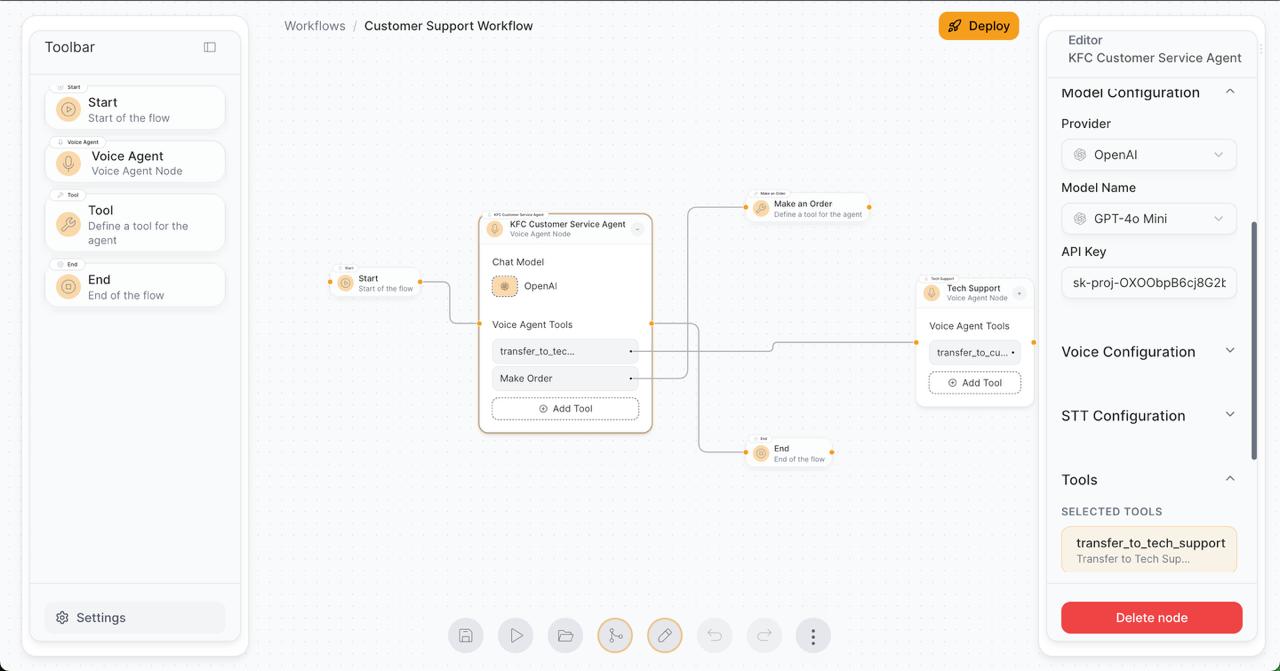
A transfer is just a tool wired to another agent node. Customer service to tech support routing, and back again, is drawn on the canvas rather than coded. The flagship example flow does exactly this: a KFC customer service agent with a Make Order tool and a transfer to a tech support agent that can transfer back.
→Full HTTP configuration in the Tool node
Instead of a curated list of integrations, any REST endpoint is callable: templated URLs, custom headers, and body modes. That is what lets an agent actually place an order against a real API mid-conversation instead of only answering questions.
→Preview before deploy, always
You cannot unit test a conversation. The preview modal runs the real agent with a validity check on the compiled flow, so builders catch broken wiring where it is cheap, before a customer ever hears it.
→Releases, not overwrites
Each deploy creates a versioned release with history, so live embeds keep working while the builder iterates on the next version.
Implementation Breakdown
The node editor
The canvas is where the product's promise gets kept: if drawing the flow is hard, no-code is a lie. I worked on the editor experience of dragging, wiring, and configuring nodes.
- Toolbar of node types (Start, Voice Agent, Tool, End) that drag onto the canvas and wire together
- Selected-node editing in a side panel with collapsible sections, so a Voice Agent's model config, tools, voice, and STT settings stay navigable
- The example Customer Support Workflow shows the shape: Start into a KFC Customer Service Agent with two tools, Make Order wired to a Tool node hitting a REST endpoint, and transfer_to_tech_support routing to a second agent node that can route back, with both paths sharing an End node
Tool nodes: giving agents hands
Tool calling is what separates a voice agent from a voice FAQ. The Tool node turns any REST API into something an agent can use mid-conversation.
- Name and description that tell the agent when to use the tool (for example, Make Order: a tool to make an order from KFC)
- Method and URL with templated path parameters for values the agent fills at call time
- Custom headers as key-value pairs, and body config as none, JSON, or form data, with a raw JSON mode for power users
Preview, deploy, and embed
The last mile I worked on: proving the agent works, then shipping it. The whole deployment story for the end user is a single script tag.
- Workflow Preview modal: a Valid badge confirming the flow compiles, an animated voice orb for idle and speaking states, and both mic and typed input for testing
- Agent settings inside preview, organized under General, Persona, and Layout tabs: chat input, video input, screen share, pre-connect buffer, and a voice selector for end users
- Deploy modal with Deploy, Embed & Preview, and History tabs. Deploying creates a release and generates the embed snippet; on the host site a popup launcher appears bottom-right
<script
  src="https://kysoo.vercel.app/embed-popup.js"
  data-lk-sandbox-id="https://kysoo"
  data-workflow-id="765b2069-3df4-4cd2-94ce-08767c248f03"
></script>
Challenges & Solutions
#1Letting non-developers wire arbitrary APIs
The Problem
The Tool node has to expose real HTTP power (templated URLs, headers, body modes) without turning into a developer tool that scares off the exact users Kysoo exists for.
The Fix
Progressive disclosure in the config: the simple path is name, description, method, and URL, while headers, templated parameters, and raw JSON body mode are there when needed but never in the way. The agent's tool description does the semantic work of deciding when to call it.
#2Trusting a voice agent before it goes live
The Problem
A builder will not embed an agent on their website without having talked to it first, and a conversation cannot be unit tested. Broken flows had to be caught before deploy, not after.
The Fix
The Workflow Preview modal runs the actual agent against the compiled flow, with a Valid status badge for structural checks and live voice or text conversation for behavioral ones. The orb's visual states make it obvious when the agent is listening versus speaking during a test call.
#3Iterating without breaking live embeds
The Problem
Once a script tag is on a customer's website, the workflow behind it cannot simply be edited in place. Builders need to keep improving flows that are already deployed and public.
The Fix
Deploys create versioned releases rather than overwriting, with a History tab tracking them. The embed keeps serving its release while the builder iterates, and the next deploy cuts a new one.
Results & Impact
Kysoo is live at kysoo.vercel.app with a working example workflow that demonstrates the core value proposition end to end: multi-agent handoff between customer service and tech support, plus a real API-backed order tool, built entirely on the canvas and embeddable with one script tag.
Before → After
Building a voice agent
Department handoff
Putting it on a website
Business Outcome
Kysoo positions no-code voice AI for the businesses that need it most: order taking, support routing, and API-driven actions, testable live in the browser and deployable to any site a customer already has.
Reflections
Would Do Differently
- 01Push validation deeper than a flow-level Valid badge, toward per-node lint messages that point at the exact misconfigured field
- 02Ship more embed variants alongside the popup, since an inline widget is the natural next request from anyone embedding an agent into a page layout
Key Takeaways
- 01A node canvas is a compiler front end. The real product is the graph-to-agent compilation underneath, and the editor's job is to make invalid graphs hard to draw
- 02Tool calling is the feature that makes agents act instead of just answer. The HTTP Tool node is where Kysoo stops being a chatbot builder
- 03Preview is a trust feature, not a convenience. Nobody embeds an agent they have not personally talked to
Next Project
Production Nomad Cluster
Platform Engineering
